

Memory Management with Pointers
Chapter 12
Learning Outcomes
After studying this lecture, students should be able to:
- Identify and differentiate memory regions (static, stack, heap).
- Use references/aliases correctly in C++.
- Explain call stack mechanics and stack frames.
- Recognize stack overflow conditions.
- Manage dynamic memory with
new/deleteand understand fragmentation. - Compare C++ memory handling with Java’s garbage collection.
- Use pointers safely; identify common memory errors.
- Perform pointer arithmetic and relate pointers to arrays.
- Describe garbage collection; understand smart pointers in C++.
- Master terminology: dangling pointers, garbage, memory leaks.
References & Aliases
A Review of C++ References & Aliases
In a parameter declaration, the
&symbol makes a reference.
The parameter refers to the memory location of the original variable.cppvoid limit(double& value, double max) { if (value > max) { value = max; } } double score = 120.5; limit(score, 100.0); std::cout << score << '\n'; // 100.In a variable declaration,
&makes that variable an alias.cppdouble score = 205.3; double &alias = score;The variable is a new name for the old variable location.
Before an existing variable,
&evaluates to the variable’s memory address.cppdouble score = 91.3; std::cout << &score; // score's address.
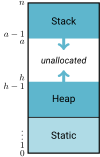
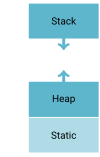
Three Memory Regions (for Data Storage)
Static storage: storage for objects with static storage duration is allocated before program execution and remains for the program's lifetime.
Call Stack (or execution stack): memory associated with active functions.
- Structured as stack frames (i.e., activation records)
Heap: dynamically allocated storage, managed by the runtime allocator.
Static Data Memory
The simplest memory to manage.
Includes objects with static (unchanging) storage duration. For example:
global variables,
static variables, and
machine code (instructions for function and class definitions).
Characteristics:
Storage requirements are known before execution.
The size of the static storage area is constant throughout execution.
The Call Stack
The Call Stack (i.e., the Runtime Stack or Execution Stack) is a contiguous memory region that grows and shrinks.
Supports function calls.
The stack grows when a function is called (activated); its stack frame (or activation record) is pushed on top.
It shrinks when the function terminates; storage is deallocated.
Stack Frames
For each function call, a stack frame stores local variables, parameters, and return linkage.
Its contents and time of allocation are determined at runtime. Its exact size and layout are known at compile time.
How is variable lifetime affected by stack management techniques?
Click here to step through this example code.
int add(int a, int b)
{
  return a + b;  // <- 3
}

int doubleAdd(int a, int b)
{
  return add(a, b)
    + add(b, a);  // <- 2
}

int main()
{
  int total = 0;
  total = add(1, 2);
  total = doubleAdd(3, 4); // <- 1

  return 0;
}| Call Stack | |
|---|---|
main() total → 0 | |
doubleAdd() int a → 3 int b → 4 | |
add() int a → 4 int b → 3 | |
Stack Overflow
The call stack and heap grow towards each other (in many implementations) as required by program events.
The following relation must hold:
In other words, if the stack top bumps into the heap, or if the beginning of the heap is greater than the end, there are problems!
Heap Memory
Heap objects are dynamically allocated/deallocated at runtime (not associated with function call/return).
Dynamic storage is acquired at runtime, independently of function calls and returns.
The kind of data found on the heap is language-dependent.
Typically holds strings, dynamic arrays, objects, and linked structures
Java and C/C++ have different policies.
Heap Memory Example
Click here to step through this example code.
#include <iostream>

int main()
{
  const int SIZE = 3;
  int stackArray[SIZE];      // Declared on the stack
  int *heapArray;            // Declare pointer to memory location
  heapArray = new int[SIZE]; // Declare array on heap

  std::cout << "stackArray  = " << stackArray << std::endl;
  std::cout << "heapArray   = " << heapArray << std::endl;

  stackArray[2] = 20;
  heapArray[2] = 20;

  delete[] heapArray; // Free up the memory from the heap array
  heapArray = nullptr; // Set pointer to point to address 0.

  return 0;
}The
newoperator allocates heap storage.The
deleteordelete[]operators deallocate heap storage for reuse.Space is allocated in variable-sized blocks, so deallocation may leave “holes” in the heap (fragmentation).
- Compared to the deallocation of stack storage
Heap Management
Some languages (e.g., C, C++) leave heap storage deallocation to the programmer.
Others (e.g., Java, Perl, Python, list-processing languages) employ garbage collection to reclaim unused heap space.
newreturns the start address of an unused block from the heap and changes its state from unused to reserved (and undefined).Suppose a Point class has three 4-byte data members:
, , . Point firstCoord = new Point();
requires at least allocatedbytes.
Heap Allocation Failure
An allocation can fail when the program cannot obtain enough storage. By default,
newthrowsstd::bad_allocexception.Fragmentation can contribute to failure for requests that require a large contiguous block, such as an array allocation.
Heap Management Operations
deletereleases a storage block to the allocator.The storage block's status is set to unused and is available for allocation by future calls to
new.Failing to release unused storage can eventually contribute to heap allocation failure.
Pointers
Pointers are addresses (i.e., the value of a pointer variable is an address).
A pointer can point to an object with static, automatic (stack), dynamic (heap), or thread storage duration.
Java does not expose explicit pointer arithmetic. In typical JVM implementations, objects are heap allocated while local reference variables are stored in stack frames.
This topic is covered well in the textbook’s Chapter 12.
Memory Allocation Java vs C++
| Java | Stack Example | Heap Example |
|---|---|---|
| Primitives | int a = 3; | int[] a = new int[1]; |
| Classes | Does not exist. | String str = new String("Hi!"); |
| C++ | Stack Example | Heap Example |
| Primitives | int a = 3; | int *a = new int; |
| Classes | string str("Hi!"); | string *str = new string("Hi!"); |
Examples in Code
In class, we will create and test out some more pointers.
Java Versus C/C++ Arrays
In Java, arrays are always allocated dynamically from heap memory.
In many other languages, including C++:
Structure Location Globally defined arrays static memory. Local (to a function) arrays stack storage. Dynamically allocated arrays heap storage. Dynamically allocated arrays also have stack storage — a reference (pointer) to the heap block that holds the array.
Comparing Pointers
int i = 5, j = 5;
int *ptrJ1 = &j;
int *ptrJ2 = &j;
int *ptrI = &i;True/False:
if (ptrJ1 == ptrJ2) {}→ Trueif (ptrJ1 == ptrI) {}→ Falseif (&ptrJ1 == &ptrJ2) {}→ Falseif (*ptrJ1 == *ptrI) {}→ True
Click here to see the visualization for this code.
Assigning a value to a dereferenced pointer.
A pointer must point to a valid object before you can dereference it (follow the pointer).
int *p;
*p = 3;Undefined Behavior! p holds an indeterminate location.
int foo;
int *p = &foo;
*p = 3;This is fine. p points to foo.
Pointers to Pointers
| Declaration | Visualization |
|---|---|
int *x = # | 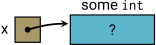  |
double *y; | 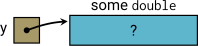  |
int **z = &x; |   |
An Example
int num = 5;
int *pNum = #
int **ppNum = &pNum;Then:
ppNumstores the memory location ofpNum.*ppNumstores the memory location ofnum.**ppNumequals5.
Array Pointers
Declaring Arrays
Typical C/C++ array declarations.
cppint arr[5]; // stack double arr1[10][15]; // stack int *intPtr = new int[5]; // heapTypical Java array declarations:
javaint[] arr = new int[5]; double[][] arr1 = new double[10][5]; Object[] arr2 = new Object[100];
Allocation of Stack and Heap Space for an Array
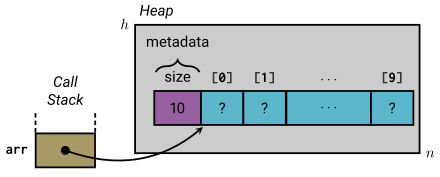
int *arr = new int[10];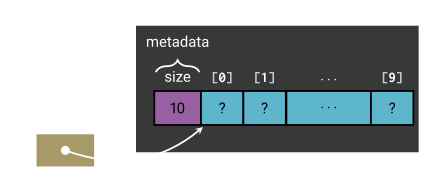
int *arr = new int[10];Pointers and Arrays
An array identifier is not a pointer, but in most expressions it converts ("decays") to a pointer to its first element.
You can use the
[]operator with pointers!Example:
int A[5];- Creates a memory block of 5 integers on the stack (5 × 4 bytes).
- A (the pointer) points at the beginning of the array.
A→A[0].(A == &A[0])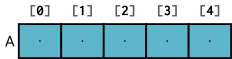
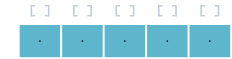
Example:
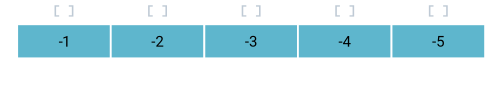
cppint *x; int a[5] {-1, -2, -3, -4, -5}; x = &a[2]; // x is the address of a[2]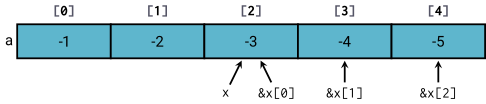
 cpp
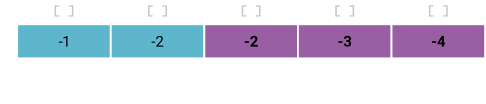
cppfor (int i = 0; i < 3; i++) x[i]++; // x[i] is the same as a[i+2]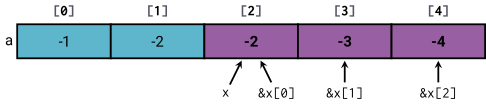
Pointer Arithmetic
Integer arithmetic (
+,-,++,--,+=,-=) can be used with pointers that refer to elements of the same array (or one past its end).Increment moves a pointer to the next element, scaled by the size of the pointed-to type.
cppint a[5] {-1, -2, -3, -4, -5}; int *ptr = a;
 cpp
cpp*(ptr + 3) = 400;

Memory Errors
Pointer Pitfalls
Assigning values to uninitialized, null, or deleted pointers:
int* p;
*p = 3;int* p = nullptr;
*p = 4;int* p = new int;
delete p;
*p = 5;Each of the above statements has undefined behavior and may result in a segmentation fault.
Memory Leaks
A memory leak occurs when dynamically allocated storage becomes unreachable without first being deallocated.
Example:
int *p = new int; // An int value's address
p = nullptr; // The allocated int is now unreachable.Result?
Memory Leak! (Orphan Blocks)
Must free memory block before changing reference.A memory leak can diminish the performance of the computer by reducing the amount of available memory.
Eventually, in the worst case, too much of the available memory may become allocated
and all or part of the system or device stops working correctly, the application fails, or the system slows down.
TIP
Use Valgrind with --leak-check=yes option if your implementation has memory leaks.
Reference the Valgrind User Manual, The Valgrind Quick Start Guide, or Graphical User Interfaces.
* The -g flag includes debug information, making Valgrind reports easier to interpret.
Problem: Multiple Pointers to the Same Address
A second problem can occur when multiple pointers are assigned to a block of heap memory.
Deleting the block does not change any pointer automatically. All pointers to that block must be set to
nullptror they are dangling.Dereferencing dangling pointers is undefined behavior and the allocator reuses the storage.
Dangling Pointer: A pointer that points to an invalid location.
Example:
int *p, *q;  // Create two pointers
p = new int; // Allocate an int on the heap.
q = p;       // Points to the same address.
*p = 4;      // Heap-allocated int set to 4.
delete q;    // Frees the heap memory.
*p = 3; // Undefined behavior!pandqpoint to the same location.When
qis deleted,pbecomes a dangling pointer!
Garbage Collection
Memory Leaks and Garbage Collection
The popularity of object-oriented programming has led to an emphasis on heap storage management.
Objects are considered active or inactive.
Active objects: blocks accessible through a pointer or reference.
Inactive objects: inaccessible blocks; no reference exists (also called orphans or garbage).
The terms accessible and inaccessible may be more figurative than objectively true.
Garbage Collection
A garbage collector identifies unreachable objects and reclaims their storage.
Some garbage collectors also compact the heap by moving objects together to reduce fragmentation.
C and C++ normally require the programmer to manage dynamic storage. If dynamically allocated storage is not explicitly freed, it can become garbage and cause a memory leak.
- Non-standard garbage collectors are available for C++.
Java, C#, Python, JavaScript, Perl, and most scripting languages perform garbage collection.
- Some still use
newor a similar construct to create objects, but they perform automatic reclamation.
- Some still use
Garbage collection was pioneered by languages like Lisp, which constantly creates and destroys linked lists.
C++ includes smart pointers, enabling automatic object lifetime management.
Review
Three commonly discussed memory regions:
- Static storage
- Call stack
- Heap
Problems with heap storage:
Memory leaks (garbage): failure to free storage when pointers (references) are reassigned.
Dangling pointers: when storage is freed, but references to the storage still exist.
Allocation of Stack and Heap Space for an Array
int *arr = new int[10];int *arr = new int[10];Garbage
Garbage: dynamically allocated storage that is no longer reachable by the program but has not been reclaimed.
Garbage is created in several ways:
A function ends while the only pointer to dynamically allocated storage is a local variable. The pointer is gone.
A node is unlinked from a linked data structure but is not deallocated.
…
Terminology
A dangling pointer (or dangling reference) is a pointer (reference) that refers to an object whose lifetime has ended.
An orphan (or garbage) is a dynamically allocated memory block that is no longer accessible through any pointer.
A memory leak is a gradual loss of available memory due to the creation of garbage.
Review Questions
The following are some questions for you to verify your understanding.
Conceptual Questions
What are the three primary memory regions in a C++ program, and what are their main characteristics?
Define the following terms:
- Dangling pointer
- Memory leak
- Garbage (or orphaned memory)
Explain the difference between stack allocation and heap allocation.
How does a stack overflow occur, and what typically triggers it?
Compare memory management in C++ and Java. What are the key differences regarding allocation and deallocation?
Pointer and Reference Questions
What is the difference between a pointer and a reference in C++?
Given the code snippet below, what is the output and why?
cppint x {5}; int* p = &x; *p = 10; std::cout << x;Identify the potential error(s) in the following code:
cppint* ptr = new int{42}; delete ptr; std::cout << *ptr;Explain how pointer arithmetic works when traversing an array. Give a short example.
Applied / Problem-Solving Questions
A function allocates memory on the heap but never frees it. What problem does this create over time? How can it be avoided?
Draw a diagram of the stack after the following function calls (before they return):
cppvoid foo() { int a; } void bar() { int b; foo(); } int main() { bar(); return 0; }Consider the following C++ snippet:
cppint* arr {new int[5]}; arr[0] = 10; delete[] arr; arr[0] = 20;What is wrong with this code?
How would you fix it?
Lab 3: Pointers
Complete Lab 3 on Blackboard.