

B Trees
Chapter 14 of Open Data Structures
Motivation for B-Trees
Index structures for large datasets cannot fit in main memory.
Disk and SSD storage require a different approach to efficiency.
Modern SSDs have random access times of approximately 100--200 microseconds.
One SSD access takes more time than 500,000--2,000,000 CPU instructions (on modern multi-GHz processors).
One SSD access is approximately 1,000--10,000 times slower than reading from main memory (50--100 ns).
Suppose an AVL tree is used to store 20 million
records on an SSD.This very deep binary tree requires lots of SSD accesses;
accesses
microseconds per accessmilliseconds. We know we can't improve on the
lower bound on the search for a binary tree. The solution is to use more branches and, thus, reduce the tree height!
- As branching increases, depth decreases, so fewer expensive storage accesses are needed.
Realistic Worst-Case Scan
You need to scan all records in a 1-billion row table.
Assume each random access is
AVL/BST lookup per key:
random reads (height ). AVL I/O time:
days
(orminutes at parallelism). B-tree (order
) height: ; therefore, reads/key. B-tree I/O time:
days
(orminutes at parallelism).
Takeaway: Even with parallelism, reducing tree height from 30 to 5 saves
Web Search Scale
Live system:
AVL tree depth:
.
SSD accesses/query =ms/query at /access. B-tree height (order
): . SSD accesses/query = ms/query. 10k q/s: AVL =
seconds of SSD work per second (queueing backlog).
B-tree =seconds of SSD work per second.
AVL-style access causes user-visible stalls under load, while a B-tree design maintains low-latency response.
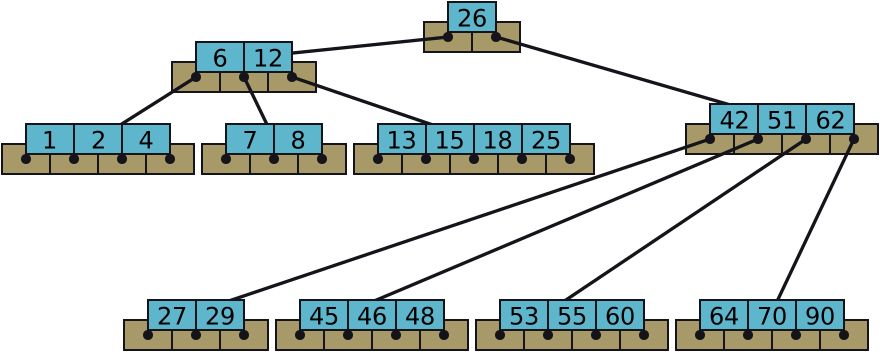
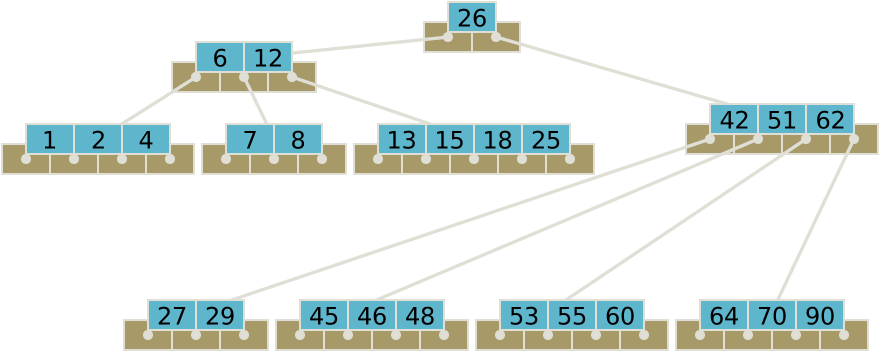
Definition of a B-tree
A B-tree of order
is an -way tree (i.e., a tree where each node may have up to children) in which: All leaves are on the same level.
The number of children of a non-leaf node is always one more than the number of keys.
All keys of a node are sorted in increasing order. These keys partition the child keys as a search tree.
The root is either a leaf node or has two to
children. Other non-leaf nodes have at least
children. A node contains no more than
keys.
The number
should always be odd.
Insert
Constructing a B-Tree
Starting with an empty Order-5 B-tree, let’s insert the
following sequence of keys:
1, 12, 8, 2, 25, 6, 14, 28, 17, 7, 52, 16, 48, 68, 3, 26, 29, 55, 45.
The first four items (1, 12, 8, 2) go into the root:
1 / 1Putting the fifth item (25) in the root would violate condition 5.
Therefore, when 25 arrives, pick the middle key to make a new root.
1 / 16, 14, and 28 get added to the leaf nodes.
Adding 17 to the right leaf node would over-fill it.
1 / 1So, the middle key is promoted (to the root), splitting the leaves.
We can now add 7, 52, 16, 48 to the leaf nodes.
Adding 68 to the right leaf node would over-fill it.
So we split the rightmost leaf, promoting 48 to the root.
Adding 3 to the left leaf node would over-fill it
Adding 3 causes us to split the leftmost leaf, promoting 3 to the root.
26, 29, 55 then go into the leaves.
Adding 45 causes a split of the 4th leaf.
Promote 28 to the root, which causes the root to split.
Promote 28 to the root; doesn’t fit.
Promote the 17 as the new root.
Attempt to insert the new key into a leaf.
If this would result in that leaf becoming too big, split the leaf into two, promoting the middle key to the leaf’s parent.
If this would result in the parent becoming too big, split the parent into two, promoting the middle key.
This strategy may need to repeat to the root.
If necessary, the root is split in two and the middle key is promoted to a new root, making the tree one level higher.
Exercise in Inserting a B-Tree
Insert the following keys to a 5-way B-tree:
3, 7, 9, 23, 45, 1, 5, 14, 25, 24, 13, 11, 8, 19, 4, 31, 35, 56, 2, 6, 12.
Deletion from a B-Tree
There are four removal cases to consider in order.
- Key is in a leaf: Delete the key.
- Key is not in a leaf: Its predecessor and successor must be in leaves. Delete the key and promote either the predecessor or successor (implementor's choice) to replace it in the non-leaf position.
After performing Case 1 or 2, a leaf node may now have too few keys (underflow). We will fix this underflow with Case 3 or 4.
When removing a key would cause underflow (too few keys), handle it as follows:
- Sibling has spare keys — Rotate:
- Pull a key from a sibling up to the parent.
- Demote the parent key down into the lacking leaf.
- Neither sibling has spare keys — Merge:
- Combine the lacking node, sibling, and parent key into one node.
- If the parent now underflows, recursively apply Cases 3 or 4 to it.
Type 1: Simple Removal from Leaf
Assuming a 5-way B-Tree (as before), delete 2.
Because there are enough keys in the node, just delete it.
Type 2: Simple Removal from Non-Leaf
Assuming a 5-way B-Tree (as before), delete 52.
Replace with the closest value from a leaf with enough values.
Type 4: Too few keys in node and its siblings
Delete 72
Type 3: Enough siblings
Delete 22
Exercise in Removal a B-Tree
Given a 5-way B-tree created by these data (last exercise):
3, 7, 9, 23, 45, 1, 5, 14, 25, 24, 13, 11, 8, 19, 4, 31, 35, 56, 2, 6, 12
Delete these keys: 4, 5, 7, 3, 14, 45
Analysis
Maximum Keys in an Order-
Max keys per level:
| Level | Key Count |
|---|---|
| root | |
So, the maximum number of items is:
When
Big-
| Operation | Balanced Binary Tree | |
|---|---|---|
| Insert | ||
| Find | ||
| Delete |
The benefits are:
- Reduced hard-drive access (but the same number of instructions) and
- Reduced memory usage (fewer pointers).
Reasons for Using B-Trees
When searching tables held on a hard drive, the cost of each drive transfer is high but doesn’t depend much on the amount of data transferred, especially if consecutive items are transferred.
For example, an order 101 B-tree can transfer each node in one drive read operation.
An order 101 B-tree and height 3 can hold
items (approximately 100 million) and any item can be accessed with 3 drive reads (assuming we hold the root in memory).
If we take
- B-Trees are always balanced (since the leaves are all at the same level), so 2-3 Trees make a good type of balanced tree.
Comparing Trees
Binary trees
Can become unbalanced and lose their good time complexity (big
). AVL Trees are strict binary trees that overcome the balance problem.
Heaps remain balanced but are unsorted.
Multi-way trees
B-Trees are
-way, with any (odd) number of children. The 3-Way B-Tree (a.k.a 2–3 Tree) approximates a self-balancing binary tree, exchanging the AVL tree’s balancing operations for insertion and (more complex) deletion operations.
What does the “B” in B-Tree stand for?
No one knows.
The inventors of the B-Tree will not say what it means.
It could mean: Boeing (where it was invented), balanced, between, broad, bushy, and Bayer (the inventors are Bayer and McCreight).
“The more you think about what the ‘B’ in B-trees means, the better you understand B-trees.”
— Edward M. McCreight (2013)
Variations
Introduction to B*-Trees
B*-Trees are a B-Tree variant that increases node occupancy for better space utilization.
B*-Trees require non-root nodes to be at least
full (vs. full in B-Trees). Insertions may redistribute keys among siblings before splitting, reducing splits overall.
This typically yields denser nodes and fewer I/O operations in large storage systems.
B*-Trees preserve B-Tree search costs while improving storage efficiency.
Introduction to B+Trees
B+Trees are a variant of B-Trees that further optimize for disk-based storage and range queries.
All data (or pointers to data) are stored only in leaf nodes.
Internal nodes store only keys (no records); therefore, they can hold more keys.
Leaf nodes are linked sequentially, enabling fast full-range scans and ordered iteration.
Higher fan-out and fewer disk reads per access make B+Trees popular in databases and file systems.
Insertion and deletion keep leaves at the same depth, preserving strong balance and performance.
Advanced B-Tree Variations
Beyond B+Trees and B*-Trees, researchers and systems developers have created specialized variants:
Bε-Trees: Write-optimized variants with buffered internal nodes to batch insertions, useful for heavy write workloads in key-value stores.
B-Link Trees: Concurrency-friendly variants with sibling pointers and latch-free search paths, common in database index implementations.
Cache-aware/Cache-oblivious B-Trees: Variants optimized for modern memory hierarchies (L1/L2/L3 caches) rather than just disk I/O.
Lab 20: B-Trees
Let’s look at the lab based on today’s lecture.