

Queues and Midterm Expectations
Chapter 17
Objectives
In this lecture, you will:
Learn about queues.
Examine various queue operations.
Learn how to implement a queue as an array.
Learn how to implement a queue as a linked list.
Understand common queue operations and their expected time complexity.
Discover how to use queues to solve simulation problems.
Introduction
Queue: a data structure in which elements are
added from one end (the back) and
removed from the other end (the front).
First In, First Out (FIFO) data structure
Operations: enqueue, dequeue, front/peek, initialize, destroy, check for empty/full queue
Can be implemented as an array or linked list.
Middle elements should not be accessed directly.
Example: Waiting in line in a bank.
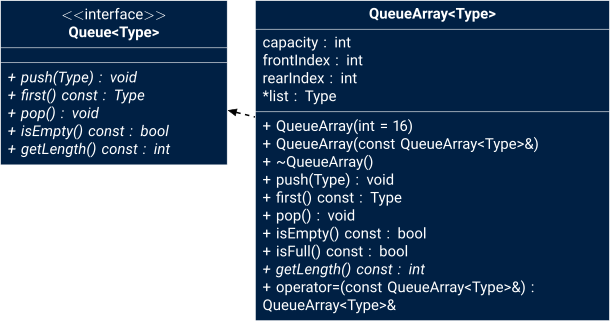
Queue interface
Queue interfaceArray-Based Queue Implementation
Need at least four (member) variables:
Array to store queue elements
frontIndexto track the first element.rearIndexto track the last elementcapacityto specify the maximum size of the queue.
Initialization and indexing notes
A common convention is to have
frontIndexpoint to the index of the current front element, andrearIndexpoint to the index of the last element. Another convention is to letrearIndexpoint to the next free slot. Be consistent in your implementation and document the choice.To advance an index in a circular buffer use:
next = (index + 1) % capacity.To compute the current number of elements when using
frontIndexandrearIndexwithrearIndexpointing to the next free slot:(rearIndex - frontIndex + capacity) % capacity.
Enqueue Array-Based Implementation
To add an element to the queue:
++mRearIndex; // (Incomplete!) Advance to the next position.
mpList[mIndexRear] = value; // Add element to positionExample: Enqueue the values A, B, and C.
See the lecture video above for the full example.
Dequeue in Array-Based Implementation
To remove an element to the queue:
++mFrontIndex; // (Incomplete!) Advance to the next position.Example: Dequeue one value.
See the lecture video above for the full example.
Problem: Unusable Space
As we add and remove elements, mRearIndex and mFrontIndex only increase, leaving unusable space at the beginning of the array.
Example state after a sequence of 10 enqueues and 8 dequeues.
Slow Solution: When the queue overflows at the rear (mRearIndex == mCapacity) and if there is room at the beginning (mFrontIndex > 0),
shift all elements towards the first array position.
Problem: Too slow for large queues.
Solution: Circular Array
Better Solution: Assume that the array is circular (it wraps around to the beginning).
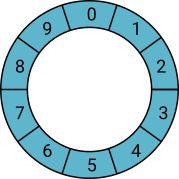
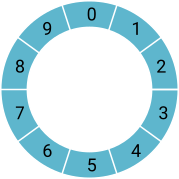
Example: Enqueue Z
Enqueue pattern (circular buffer, rearIndex is the last element):
if (isFull()) {
  // handle overflow: return error or resize
}

mRearIndex = (mRearIndex + 1) % mCapacity; // Incomplete
mpList[mRearIndex] = value;
++mSize; // if using size trackingDequeue pattern (circular buffer):
if (isEmpty()) {
  // handle underflow: return error or throw
}
Type value = mpList[mFrontIndex];
mFrontIndex = (mFrontIndex + 1) % mCapacity;
--mSize; // if using size tracking
return value;Circular Array: Full or Empty?
Problem: Differentiating between empty queues and full queues.
Example: Dequeue the only remaining value.
See the lecture video above for the full example.
Problem: Differentiating between empty queues and full queues.
Example: Enqueue into the last available space.
See the lecture video above for the full example.
Problem: In the previous two examples, notice that the state of
frontIndexandrearIndexis the same for full and empty queues.How can we tell the difference?
Solution 1: Keep track of the size.
Initialize the size to
0.Incremented when a new element is added to the queue.
Decremented when an element is removed.
Very useful if the user (of the queue) frequently needs to know the number of elements in the queue.
template <typename Type>
bool QueueArray<Type>::isEmpty() const {
  return mSize == 0;
}

template <typename Type>
bool QueueArray<Type>::isFull() const {
  return mSize == mCapacity;
}

template <typename Type>
QueueArray<Type>::QueueArray(const int capacity)
  : mCapacity{capacity},
	mSize{0}, // no elements in queue yet
	mFrontIndex{0},
	mRearIndex{capacity - 1},
	mpList{new Type[capacity]}
{
}Solution 2: Let indexRear indicate the position right after the last element.
indexFrontstill indicates the index of the first element.Queue empty if
indexFront == indexRear.Slot indicated by
indexFront - 1is reserved (cannot be added to in a push).The queue is full if the next available space is the reserved slot indicated by queueFront.
(indexRear + 1) % capacity == indexFront
Using a reserved slot in the array.
See the lecture video above for the full example.
Resizing considerations
For dynamic queues, when this size matches the capacity, you can allocate a larger array (for example double the capacity), copy elements in order starting from
frontIndex, and resetfrontIndexandrearIndexappropriately. This gives amortizedtime per enqueue. If you shrink capacity on dequeues, do so conservatively to avoid frequent reallocations.
Linked-List Based Queue Implementation
Array implementation has issues:
Array size is fixed: only a finite number of queue elements can be stored in it.
Requires array to be treated in a specific way, together with
frontIndexandrearIndex.
Linked implementation of a queue simplifies many issues.
The queue is never full because memory is allocated dynamically
We can use the same code as our linked-list implementation with head and tail pointers.
Only append new values (no prepend or insert).
Only remove from the head.
The head always points to the front of the queue.
The queue is empty if the head is null.
Linked-list considerations
- Use both head and tail pointers to make
enqueueby adding at the tail and dequeueby removing at the head. - Each node allocation has overhead and may be slower than contiguous array operations because of allocation and pointer chasing.
- Linked queues avoid allocating unused space.
Enqueue (Push)
See the lecture video above for the full example.
Dequeue (Pop)
See the lecture video above for the full example.
Simulation
Application of Queues: Simulation
Simulation: a technique in which one system models the behavior of another system.
Computer models are used to study the behavior of real systems.
Queuing systems: computer simulations using queues as the data structure.
Example: queues of objects are waiting to be served.
Simulation and modeling notes
- There are two common approaches: time-driven simulations and event-driven simulations. Event-driven simulations process events (arrivals, departures) in chronological order and are usually more efficient when events are sparse.
- Performance metrics to collect include average wait time, maximum queue length, throughput, and server utilization.
- For realistic arrival patterns consider modeling with Poisson processes or empirical distributions.
- If priorities matter, use a priority queue (more on that later) rather than a simple FIFO queue.
Designing a Queuing System
Server: an object that provides the service.
Customer: an object receiving the service.
Transaction time: the service time (i.e., the time it takes to serve a customer).
Model: a system that consists of a list of servers and a waiting queue holding the customers to be served.
- The customer at the front of the queue waits for the next available server.
What we need to know:
Number of servers
Expected arrival time of a customer
The time between the arrival of customers
Number of events affecting the system
The performance of the system depends on:
How many servers are available
A customer’s wait time for service
How often a customer arrives
If it takes too long to serve a customer and customers arrive frequently, then more servers are needed.
The system can be modeled as a time-driven simulation.
Time-driven simulation: the clock is a counter
The passage of one unit of time can be implemented by incrementing a counter by 1.
Simulation is run for a fixed amount of time.
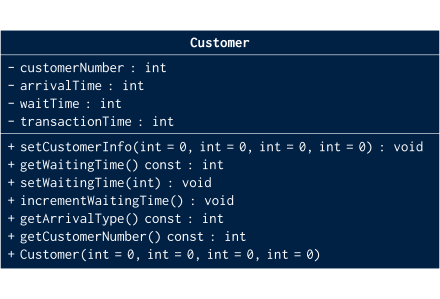
Customer class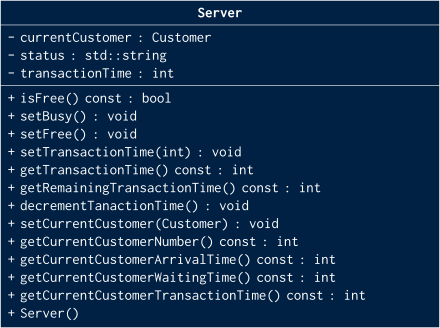
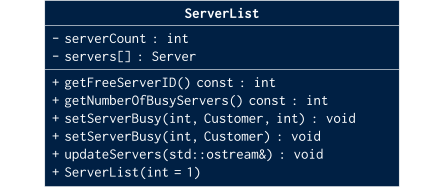
Server classServerList: a set of servers.
At any given time, a server is either free or busy.
ServerList classWaiting Customers Queue
When a customer arrives, he/she goes to the end of the queue.
When a server becomes available, the customer at the front of the queue leaves to conduct the transaction.
After each time unit, the waiting time of each customer in the queue is incremented by 1.
Can use our Queue class but must add an operation to increment waiting time.
Algorithm for the main loop
For each time unit (of the clock) from 1 to the end of the simulated time:
Updated the server list to decrement the transaction time of each busy server by one time unit.
If the customer’s queue is nonempty, increment the waiting time of each customer by one time unit.
If a customer arrives, increment the customer count by 1 and add the new customer to the queue.
While a server is free and the customer’s queue is nonempty, remove the customer from the front of the queue and send the customer to the free server.
Practical concerns
- When simulating many customers, watch for memory growth in the waiting queue and consider sampling metrics periodically rather than storing all data.
- Use deterministic seeds for random number generation when you need reproducible results.
Summary
Postfix notation: operators are written after the operands (no parentheses needed).
Queue: items are added at one end and removed from the other end (FIFO).
First In, First Out (FIFO) data structure
Operations: add, remove, initialize, destroy, check if the queue is empty/full
Can be implemented as an array or linked list.
Middle elements should not be accessed directly.
Is a restricted version of an array or linked list.
Time complexity:
enqueueanddequeuearetime in both array-based circular buffers and linked-list queues (amortized if array resizes are used). Choose array-based queues for lower per-element overhead and better data locality. Choose linked lists when you need unbounded growth and want to avoid large reallocations.
Lab 12: Stacks and Queues
Let’s take a look at Lab 12.
Midterm Exam Expectations
See the Midterm Exam Study Guide for more information.