

Binary Search Trees: Traversal
Chapter 19
What and why:
- Visit every node in a BST exactly once.
- Common orders: in-order, pre-order, post-order (depth-first); level-order (breadth-first).
- Uses: produce sorted output, copy or delete a tree, compute aggregates (size, sum, height).
Lecture Video
Traversal Orders
Traversing a tree means “visiting” each node exactly once.
We may visit each the nodes in a tree to determine its size, display it, update it, delete it, sum the values, etc.
We can visit the notes in various orders.
In-order
- Traverse the left subtree.
- Visit the node.
- Traverse the right subtree.
Pre-order
- Visit the node.
- Traverse the left subtree.
- Traverse the right subtree.
Post-order
- Traverse the left subtree.
- Traverse the right subtree.
- Visit the node.
Example of Binary Tree Traversal
- Input (one example):
E C F A D H B G
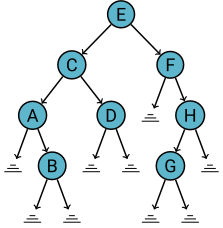
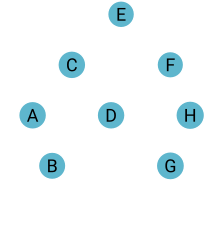
In-order sequence:
A B C D E F G HPre-order sequence:
E C A B D F H G- (Useful for copying a tree and preserving the structure.)
Post-order sequence:
B A D C G H F E- (Useful for deleting a subtree.)
Depth- and Breadth-First Traversals
The in-order, pre-order, and post-order traversals we implemented are depth-first traversals.
We could also use a queue to implement a level-based (breadth-first) traversal.
Typical Operations on Binary Tree
Determine whether the binary tree is empty.
Insert an item in the binary tree.
Delete an item from the binary tree.
Search the binary tree for a particular item.
Find the height of the binary tree.
Find the number of nodes in the binary tree.
Find the number of leaves in the binary tree.
Traverse the binary tree.
Copy the binary tree.
Lab 14: Binary Trees (Part 1)
Let’s take a look at the lab based on today’s lecture.